Best no-code and low-code tools in 2026
The only 3 I'd still use for internal tools, now that AI writes the code
In March 2024 I wrote a long guide to the best no-code and low-code tools. Fifteen of them, sorted by what they’re for and rated by ease of use.
Two and a half years later, most of that list doesn’t make sense anymore 🤷♂️
Not because the tools got worse. Because the reason to use them changed.
Back then, no-code was how you built software without writing code. Today an AI agent writes the code for you, in minutes. “I can’t code” is no longer a reason to pick a visual tool.
My short list now has three names: Airtable, Zapier and Retool. And the reason isn’t ease of use anymore. It’s security and observability.
One thing first: this post is about internal tools, the apps, automations and data your team uses to run the company. That’s what all three are for today. You can use them for products your customers see too, but it rarely makes sense.
Let me explain 👇
What I wrote in 2024
I split every app into three building blocks:
- Data: where the information lives (think Excel tables)
- Logic: the rules and workflows that move it around
- Interface: what people actually see and click
Then I picked the best tools for each one. Here’s that list again, with what I’d keep today:
Data
- Google Sheets (if you’re on Google)
- Airtable
XanoBaserow
Logic
- Zapier
- Make (side note)
Interface
SoftrWebflowBubbleWeWebGlideAdaloFlutterFlow- Airtable Interfaces
- Retool
My 2024 list: highlighted what I’d keep, crossed out what I’d drop, and the rest still has its place in specific cases
My main criterion was ease of use. “Walk before you run”, I wrote.
The three building blocks still hold. Ease of use as the main criterion doesn’t.
What changed: agents write the code now
With Claude Code, Cursor or Codex, you describe the tool you need and get working code back. Many of the apps I would have built in Bubble or Glide in 2024, today I’d just have an agent write.
That took away the biggest selling point of most no-code tools. If code costs (almost) nothing to write, why accept a visual builder’s limits, pricing and lock-in?
It also started a new illusion: if AI writes the code, anyone in the company can build their own internal tools.
And for a while, it works 🎉 Someone builds a handy little app over the weekend, then another one, and soon the whole team depends on them.
Until something breaks, or a security alert lands in your inbox, and nobody knows what the agent actually wrote. The only plan left is to ask the agent to fix it and hope for the best. That’s when the weekend project becomes a Monday morning problem.
That’s a story for another post. The short version: a prototype and a tool the whole company can rely on are two very different things. Knowing what to ask the agent, what to read in what it wrote and what to check before it goes live is what makes the difference, and that still takes experience, AI or not.
And the code is only one part of building an app. Understanding what to build (and what not to), managing it over time, getting people to change how they work and actually use it: the technical part isn’t even the most crucial one.
And it’s not just about code quality. Anyone can now ship an app in an afternoon, and a lot of those apps leak data.
In May 2026, researchers scanned about 380,000 public apps built on vibe-coding platforms and found around 5,000 exposing sensitive data: a shipping company’s vessel schedules, a bank’s internal financials, patient conversations (Axios).
Writing the app is the easy part now. Hosting it safely, controlling who sees what, and knowing what it did while you weren’t looking: that’s the hard part.
That’s where my three picks come in. They don’t replace knowing what you’re doing, but they give you solid ground to build on: hosting, logins, permissions and logs that someone else keeps safe and up to date.
What the agent writes
- The app code
What a whole company needs on top
- Hosting → Retool
- Logins and roles → Retool
- Data access rules → Retool, Airtable
- Step-by-step logs → Zapier
- Human approvals → Zapier
- Security patches → the vendor
Writing the code is one piece. These are the others, and who covers them
Airtable: the data layer that both people and AI can use
Airtable was already on my 2024 list. It stays, for a different reason.
It’s a real database that your team can still use like a spreadsheet. People edit records, build their own views and simple interfaces, without asking anyone.
The new part: Airtable now has an official MCP server. Claude, ChatGPT or any other agent can read your bases, search records and create or update them, through your Airtable login and permissions.
So you get a blend of the two worlds: people work visually, agents work on the same data. If you still want to build things visually, or mix visual and code, it’s the most complete one-stop shop I know. Its Interfaces, simple internal tools you build on top of your bases, are part of the package.
Google Sheets still has its place too: for simpler, lighter uses, or if your company already lives in Google Workspace.
Watch out for:
- Per-user pricing adds up when the whole company needs access.
- If you’re in Europe and care where your data sits: by default it’s stored in the US. EU data residency exists only on the Enterprise Scale plan, and it covers your base content, not everything (Airtable).
Retool: a safe place for the internal tools you (or your agent) build
In 2024 I gave Retool two stars out of five for ease of use. Today it’s the one I’d recommend first, and not for its drag-and-drop builder.
Since June 2026, Retool hosts React apps however you built them: with its own AI builder, straight from Claude Code or Cursor through its MCP server, or imported from Lovable, Replit or a GitHub repo (Retool).
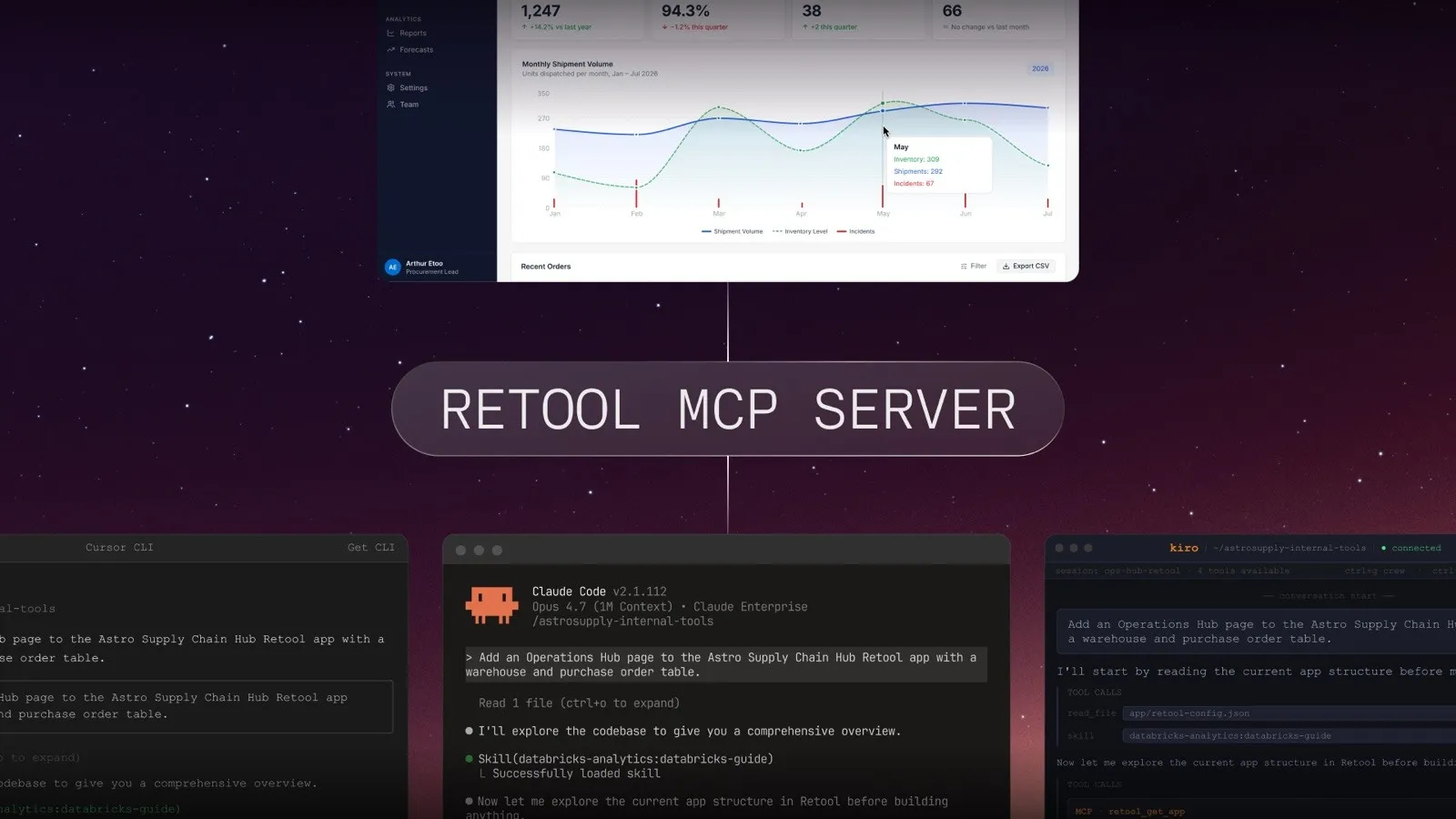
Claude Code, Cursor and Kiro building the same app through Retool’s MCP server (image: Retool)
Every app you put there gets its login, roles and data access rules from Retool, not from the code your agent wrote. You connect your databases and APIs once, and every app uses them through Retool. You can run it on Retool’s cloud, in your own cloud or on-premise.
That’s exactly the part vibe-coded apps get wrong. You keep the speed of building with AI, and hand hosting, logins and permissions to a team whose job is to get them right.
Watch out for:
- Apps built on Retool aren’t easy to move elsewhere.
- Pricing is per builder and per user (users cost less). Do the math on how many people will open the app.
Zapier: automations you can read, check and approve
In 2024 Zapier was the easy one, and the one that got expensive at scale. It’s interesting again for two reasons.
Observability. Every run is logged step by step: what came in, what went out, where it failed. You can pause a workflow until a person approves the next step. When an AI is doing part of the job, this is what lets you trust it.
Code. With Next Gen Zaps (announced in September 2026), a Zap is TypeScript code. You can describe it to Claude, ChatGPT or Cursor and deploy it to Zapier, write the code yourself, or edit it on the visual canvas. Same workflow, three ways to look at it.
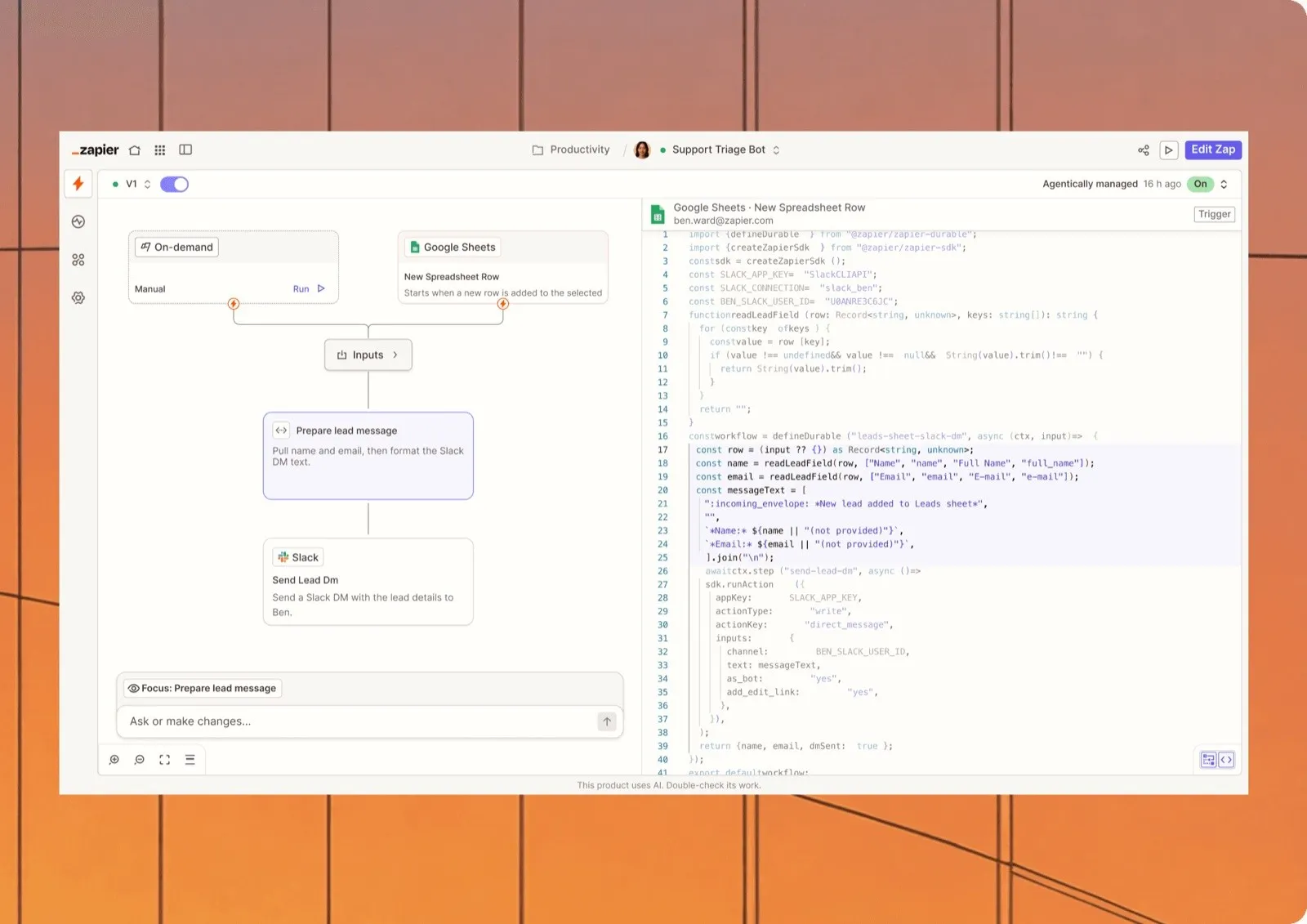
The same Next Gen Zap as a visual canvas and as TypeScript code (image: Zapier)
That takes away one of n8n’s biggest advantages over Zapier: real code and real flexibility. And there’s nothing to host.
Watch out for:
- Next Gen Zaps are still in early access: some features aren’t there yet, and their pricing isn’t announced.
- AI steps are billed by model since June 2026, and the top models cost up to 5× the tasks of a normal step (Zapier). Keep an eye on usage.
Side note: Make. I still like Make a lot, and if you prefer building on a visual canvas it’s a solid option. But it takes longer to learn, and its AI features feel a bit bolted on. Next Gen Zaps are simply cleaner and easier to use, in true Zapier fashion.
Why not n8n?
I like n8n and I’ve used it a lot. It’s open source, you can host it yourself, and your data never leaves your servers.
But self-hosting means security patches are your job. In 2026 alone, n8n had several critical vulnerabilities, including one rated 10 out of 10 (“Ni8mare”) that could let an attacker take over some n8n servers from the internet without logging in (Cyera).
A self-hosted automation server holds the keys to all your other tools. If nobody in your company watches for these alerts and updates within days, that’s a big risk.
If you have that person, n8n is great. If you don’t, pay someone whose job it is.
What about Microsoft Power Apps and Power Automate?
If your company runs on Microsoft 365, you probably already have them, and they’re well integrated with Teams, SharePoint and Excel. You can use them.
To me, they’re worse than any of the tools above.
- Licensing is a maze. Microsoft 365 only covers the standard connectors. Premium connectors and Dataverse, Microsoft’s own database for these apps, need extra licences for every user who opens the app (Microsoft). You often find out halfway through the project.
- Power Automate is a pain to use, and even more so when you call it from Power Apps. Expressions are hard to write and harder to debug.
- Apps slow down as they grow. More screens and more data, and load times and data limits start to bite, especially on SharePoint lists.
To be fair, there’s one real point in their favour: if your IT department already manages the Power Platform, with rules on what can connect to what, you get that governance for free. If that’s your situation, it’s worth a look. Otherwise, I’d pick any of my three first.
Do you need any of this?
Not if you know what you’re doing. Then an agent writes the code, and you host it, secure it and monitor it yourself.
If you don’t, you’re not running software, you’re praying.
Would you let an AI write a binding contract in a language you can’t read, and sign it? For a proof of concept, it’s fine. For something your whole company runs on, you need someone who knows what they’re doing.
And the problem isn’t speed. As soon as you add complexity, things get out of hand: you lose track of what’s happening, and you end up completely dependent on the AI that wrote it.
Vendors aren’t bulletproof either. But the choice is simple: either you know what you’re doing, or a vendor whose whole business depends on getting it right is the safer bet. With agents writing and running code inside your company, that choice matters more than ever.
My rule of thumb today
- Data your team edits by hand and agents need too → Airtable
- Workflows between your tools that someone must be able to check → Zapier
- An internal tool the whole company opens → Retool if it’s complex, Airtable Interfaces if it’s simple
- Everything else, if you know what you’re doing → plain code, written with an agent by a professional, then managed and hosted properly
Not sure which parts of your operations belong where? That’s exactly the kind of map I draw with my clients.
Ready to unleash the power of automation in your company? Send me a message to schedule a 15 min call 🚀